
What Makes an Office Chair Ergonomic? A Buying Guide
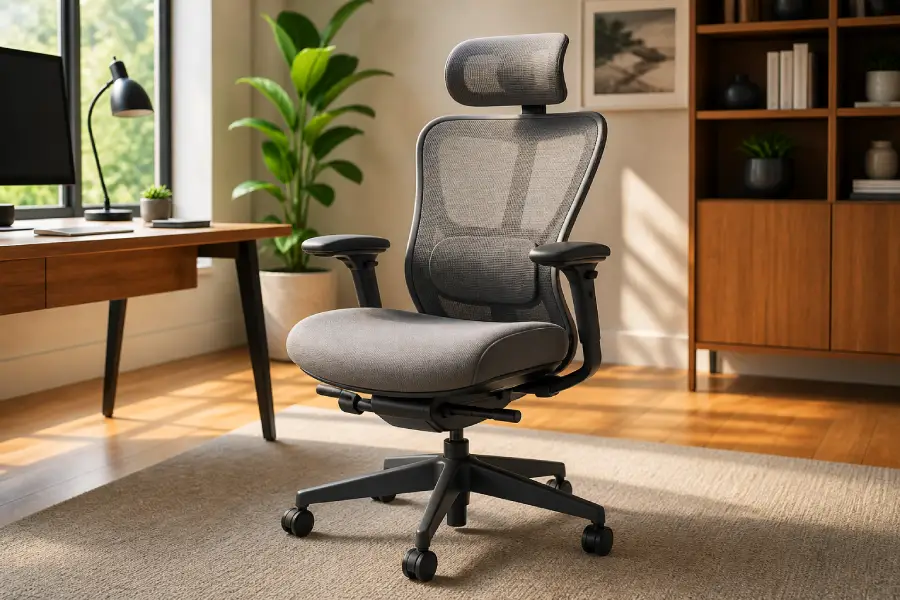
An ergonomic office chair is a chair designed to conform to the user’s body shape, support natural posture, reduce pressure on sensitive areas of the body, and allow for movement during long sitting sessions.
To put it simply, the answer to the question of what makes an office chair ergonomic is this:
An office chair is ergonomic if it offers adjustable lumbar support, seat height, armrests, and tilt, along with a contoured backrest and breathable materials to support posture and reduce strain during long use.
A proper understanding of ergonomic chair meaning and the principles of office chair ergonomics will help you make better choices and prevent back, neck, and fatigue pain.
In today’s world, where we spend many hours at an office desk, choosing a regular chair is no longer enough.
An ergonomic chair should be adjustable, support your spine, and allow you to change your sitting position throughout the day.
Together, these features help your body stay healthier and your productivity increase.
You Might Also Enjoy: From Politics to Productivity: Top 7 Office Arguments After Elections
Ergonomic Chair Meaning: What Does “Ergonomic” Really Mean?
To put it simply, ergonomic means “design based on the human body and type of use.”
For a chair, it means compatibility with your height, weight, spine shape, and work style (e.g., typing or long meetings).
So an ergonomic chair is not just a modern look or a high back.
A true ergonomic chair adjusts to you, not you to it.
Seat height, seat depth, back angle, and lumbar support should be adjustable to keep the body in a natural position.
Without proper adjustment, even the best chair loses effectiveness.
Important point: Even an expensive chair is not necessarily ergonomic if it doesn’t fit your body, desk, and work style.
Focus on real needs, not just brand or price.
The goal of office chair ergonomics is to reduce pressure on your back, neck, and shoulders, improve circulation, and help you work longer without fatigue.
If a chair doesn’t do this, it’s not truly practical—no matter how “ergonomic” it is.
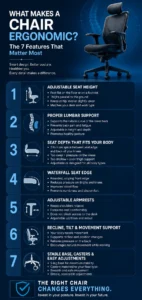
What Makes a Chair Ergonomic? The 7 Features That Matter Most
To understand whether an ergonomic chair is truly standard or just living up to its name, you need to pay attention to a few key features.
These are the core principles of office chair ergonomics that directly impact your comfort, health, and productivity:
 1. Adjustable Seat Height
The chair height should be adjusted so your feet rest flat on the floor or on a footrest, and your thighs are roughly parallel to the ground.
Your knees should be at the same level as your hips or slightly lower.
If the chair is too high, it puts pressure on the back of your thighs.
If it’s too low, your knees bend too much, and blood circulation can be restricted.
According to office chair ergonomics principles, seat height should match your desk and work type—not the other way around.
2. Proper Lumbar Support
The lower back (lumbar spine) naturally has a curve.
An ergonomic chair should support this curve, not flatten it or push it into an unnatural position.
Without proper lumbar support, posture slowly worsens and can lead to fatigue, back pain, and long-term issues.
Ideally, lumbar support should be adjustable in height and depth to match the natural shape of the lower back.
3. Seat Depth That Fits Your Body
Seat depth is one of the most important but often overlooked factors.
When you are fully leaning back, there should be about 2 to 5 cm of space between the seat edge and the back of your knees.
If the seat is too deep, it puts pressure on the back of the knees.
If it is too shallow, the thighs are not properly supported, and weight distribution becomes uneven.
A good ergonomic chair either offers adjustable seat depth or is designed to fit a wide range of body types.
You Might Also Enjoy: 16 Tips for Furnishing Your Office Space Without Wasting Time
4. Waterfall Seat Edge
The front edge of the chair should be rounded and sloping (waterfall), not sharp and flat.
This design helps take pressure off the back of the thigh and knee and improves blood flow.
This simple but important feature makes a big difference in long-term sitting comfort.
Chairs with sharp edges usually cause numbness or pressure in the legs after a while.
5. Adjustable Armrests
Armrests should be adjusted so that the shoulders remain relaxed and not pulled up.
Your forearm should rest comfortably on the handle, without having to bend or strain.
Also, armrests should not prevent the chair from getting close to the table.
In a standard ergonomic chair, the arms are usually adjustable up/down and in/out to suit your body shape and the type of work.
6. Recline, Tilt, and Movement Support
A common mistake is thinking we should always sit in a perfectly straight position.
In fact, the body needs movement to stay healthy.
A good ergonomic chair should allow reclining, tilting, and position changes without putting pressure on the back.
True ergonomic design does not lock the body in one rigid position, but supports natural movement during work.
7. Stable Base, Casters, and Easy Adjustments
Finally, the base of the chair must be stable.
Typically, 5-leg bases provide the best balance.
Casters should match the floor type (carpet, parquet, ceramic) for smooth and safe movement.
Also, all adjustments should be simple and accessible while sitting.
If adjustments are complicated, you’re less likely to use them.
You Might Also Enjoy: What Is A Cubicle: Definition, Types, and Benefits In 2026
Office Chair Ergonomics: How to Know If a Chair Fits You
| What to Check | Ergonomic Fit Guideline |
| Feet | Feet should rest flat on the floor or on a footrest. |
| Knees | Knees should stay close to hip level, without pressure behind the knees. |
| Seat depth | Leave a small gap between the front edge of the seat and the back of your knees. |
| Lower back | The lumbar support should fit the natural curve of your lower back. |
| Arms | Armrests should support your forearms while keeping your shoulders relaxed. |
| Movement | The chair should allow slight recline or tilt without losing back support. |
| Desk fit | The chair should move close enough to the desk without the armrests blocking your posture. |
| Stability | A stable base and smooth casters help the chair work safely for daily office use. |
A chair can include several ergonomic features, but the real test is whether those features fit the person using it, the desk they work at, and the amount of time they spend sitting each day.
Ergonomic Chair vs. Regular Office Chair: What Actually Changes?
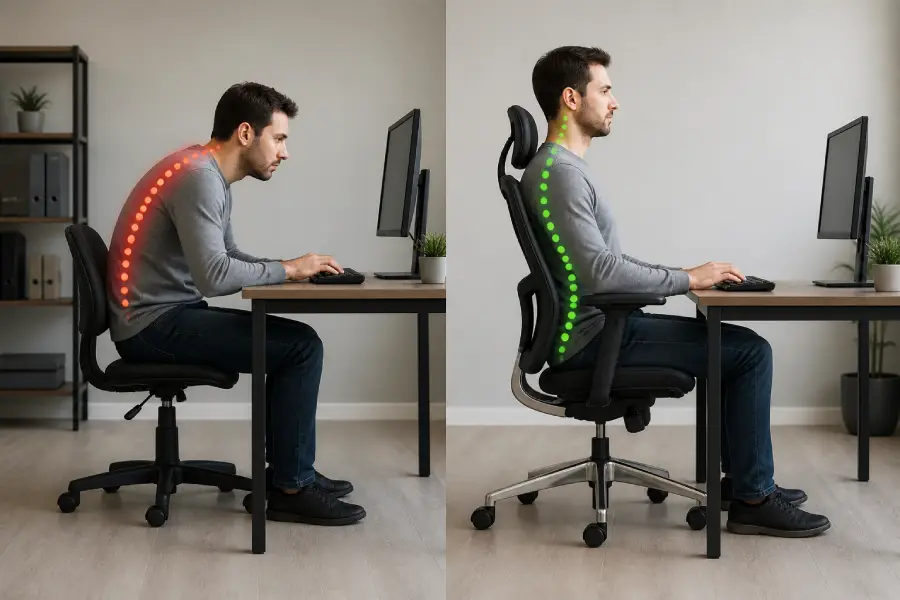
A regular office chair only meets the basic need for sitting, but an ergonomic office chair is designed to adjust to the user’s body.
The main difference is body fit.
Ergonomic chairs allow adjustment of seat height, lumbar support, armrests, recline, and seat depth for different users and work styles.
A regular chair may be fine for short use, but for long-term sitting, it often lacks support and proper adjustments.
In contrast, a good ergonomic chair reduces strain, supports natural posture, and allows small movements during the day.
However, not every chair labeled “ergonomic” is the right choice.
The best option is a chair that fits your body, desk, and work style.
Common Mistakes People Make When Choosing an Ergonomic Office Chair
Many mistakes when buying an ergonomic office chair can make even a good chair not comfortable or practical in practice.
These are the most common mistakes you should definitely pay attention to:
- Buying just because the chair says “ergonomic”: This label alone is not a guarantee of quality or fit for your body.
- Ignoring seat depth: If the seat depth is not appropriate, pressure will be placed on the back of the knees, or the thighs will not be properly supported.
- Choosing too soft cushioning instead of adequate support: Too soft is not always good; an ergonomic chair should be both comfortable and support the body properly.
- Not checking the height and position of the lumbar support: If the lumbar support is not in the right place, even a lumbar support will not help reduce back pain.
- Purchase regardless of desk compatibility: If the height of the chair is not in line with the desk, your sitting posture will be disrupted, and the pressure on your neck and shoulders will increase.
- Choosing fixed armrests for shared workspaces: Different people need different adjustments, and fixed armrests don’t provide enough flexibility.
- Forgetting that each user has different needs: Height, weight, type of work, and daily sitting time are all decisive factors in choosing a chair.
Ultimately, a good ergonomic chair should adjust to your body and work style, not you adjusting yourself to it.
You Might Also Enjoy: How AI is Influencing Furniture Design in 2026
What to Look for in an Ergonomic Office Chair for Long Workdays
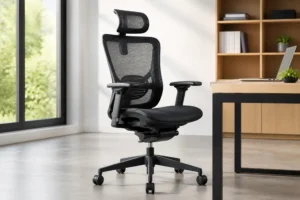 If you’re looking to buy an ergonomic office chair for long-term use, especially in busy Houston offices, focus on more than just appearance or brand name.
For daily use, adjustability, durability, and build quality matter most.
Key factors that really make a difference:
- Mesh vs upholstered: Mesh chairs have better airflow and are more suitable for long periods of sitting.
Upholstered models are softer but may retain more heat.
- Commercial-grade frame: The frame should be designed for heavy, everyday use so that it doesn’t become loose or get damaged over time.
- Weight capacity: Standardized and tested weight bearing is a sign of the chair’s quality and durability.
- Breathable back: Breathable back reduces sweating and fatigue during long work sessions.
- Adjustable mechanisms: Important adjustments such as height, lumbar support, armrests, and recline should be simple and complete so that the chair can be adapted to different people.
- Suitability for shared offices: In shared environments, seating should be quickly and easily adjustable for different users.
Important note for companies: If multiple employees use the same chair, adjustability and durability are more important than appearance.
These two factors both increase comfort and reduce future replacement costs.
Buying Ergonomic Office Chairs in Houston? Test These Before You Choose
Before purchasing ergonomic office chairs in Houston, it’s best to visit a showroom and test the chair in real conditions.
At a Houston office furniture showroom, you can compare models and find what truly works for daily use.
For companies and workspaces with multiple stations, the choice is even more critical.
In this case, look for office seating in Houston with simple adjustments, durable mechanisms, and commercial-grade support.
If a chair only works for one person but not others, it won’t be effective in an office environment.
Looking for ergonomic office chairs in Houston?
Visit our showroom or talk to our office furniture specialists at Collaborative Office Interiors to compare task chairs, executive chairs, mesh chairs, and commercial-grade ergonomic seating.
Conclusion
An ergonomic office chair is an important tool for maintaining body health during long work hours.
If a chair is properly adjusted and in harmony with your body, it can significantly reduce pressure on your back, neck, and shoulders.
As we discussed in the article What Makes an Office Chair Ergonomic?, choosing the right one isn’t just about looks or price.
You should pay attention to adjustability, lumbar support, seat depth, and build quality.
Ultimately, the best chair is one that fits your body and the type of work you do and that supports you throughout the day, rather than forcing you to sit in a fixed position.

John Ofield is the owner of Collaborative Office Interiors. Houston’s trusted source for modern and commercial office furniture, office cubicles, demountable walls, office desks and tables, and complete workspace solutions. With more than 40 years of experience, he combines deep product knowledge with hands-on space-planning expertise to create ergonomic, productivity-focused work environments for businesses across Southeast Texas.